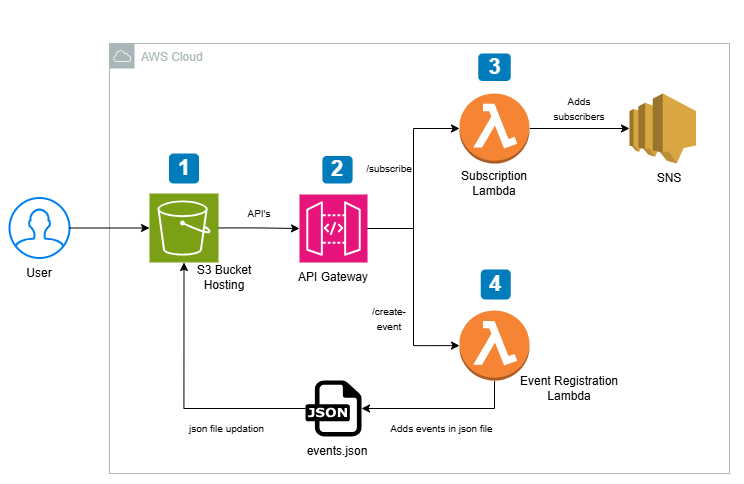

This project is a simple way to manage events that is built entirely on serverless architecture. People can sign up for an email list, see upcoming events, and admins can add new events using a simple form (password: 12345). The goal of the project is to show that a fully working backend can work without EC2, using only Lambda, API Gateway, and S3. You only pay for Lambda executions and API calls that actually happen. This is the beauty of AWS servless.
Main Features
- Sign up for email alerts about events
- Listing of public events
- Admin panel to add new events
- Automatic email alerts when new events are added
AWS S3 is used for hosting the front end and storing events.
- Holds the static front end (HTML, CSS, and JS)
- Holds the events.json file that the website uses
AWS SNS—Alerts
- Handles email subscriptions for users
- Alerts you when a new event is added.
AWS Lambda: Logic on the Backend
- Handles new event submissions
- S3 gets updated event data written to it
- Adds emails from subscribers to SNS topics
AWS API Gateway—Managing APIs
- Gives REST endpoints for:
- /subscribe
- /create-event
IAM Roles and Policies—Control Access
- Gives Lambda the rights it needs to read and write to S3 and publish to SNS.
System Flow (Plan)
1. Set up the Frontend
- Put index.html, CSS, JS, and events.json on S3.
- Allow hosting of static websites
- Use the public S3 website URL as the main way in.
2. Set up the Backend APIs
- Make API Gateway endpoints:
- POST /create-event
- POST /subscribe
- Combine them with Lambda functions
3. Manage Subscriptions
- Subscription Lambda gets an email
- Puts it in an SNS topic
- SNS sends confirmations and future notifications.
4. Take care of making new events
- Admin sends in the event form
- Changes events. json in S3
- Sends an email to all SNS subscribers
- The new event goes live on the website right away.
Putting Static Frontend files in an S3 bucket
Get a copy of the repository or clone it.
https://github.com/AliWAlrahbe/EventsMangementServerless
Make a new S3 bucket and allow public access and hosting of static websites. After that, upload the files you got from the repo: index.html, styles.css, and events.json.
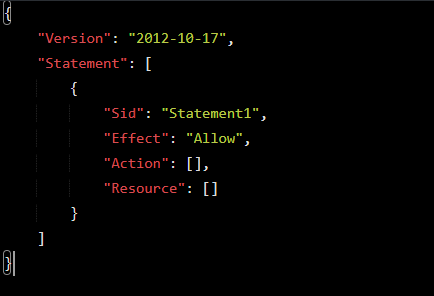
Go to the “Permissions” tab and then to the Bucket Policy. Press the Edit button. Add the policy below and then click “Save Changes”:
{
"Version": "2012-10-17",
"Statement": [
{
"Effect": "Allow",
"Principal": "*",
"Action": "s3:GetObject",
"Resource": "arn:aws:s3:::<YOUR-UNIQUE-BUCKET-NAME>/*"
}
]
}
Note: Use your bucket name instead of <YOUR-UNIQUE-BUCKET-NAME>.
From the settings for static website hosting, copy the Bucket Website Endpoint. Then, to make sure the website loads correctly, open the URL in a web browser.
SNS and First Lambda Function
1 – Create a standard SNS Topic
2 – Create IAM Role for Lambda Function
Attach Permissions Policies:
-
- Search for and select the following policies:
- AmazonSNSFullAccess – This grants the Lambda function permission to interact with SNS (subscribe users).
- CloudWatchLogsPolicy – This allows logging to CloudWatch for debugging and monitoring.
- Search for and select the following policies:
- If you can’t find the CloudWatchLogsPolicy, you can use the predefined AWSLambdaBasicExecutionRole to grant CloudWatch logging permissions.
3 – Create the Subscription Python Lambda Function
import json
import boto3

def lambda_handler(event, context):
    # Log the entire event to CloudWatch
    print("Event received:", json.dumps(event))

    if 'body' in event:
        # Parse body whether it's already a dict or a JSON string
        body = event['body'] if isinstance(event['body'], dict) else json.loads(event['body'])
        email = body.get('email')

        if email:
            sns_client = boto3.client('sns')
            try:
                # Subscribe the user to the SNS topic (email subscription)
                response = sns_client.subscribe(
                    TopicArn='REPLACE_WITH_SNS_TOPIC_ARN',
                    Protocol='email',
                    Endpoint=email
                )
                return {
                    'statusCode': 200,
                    'body': json.dumps(
                        {'message': 'Subscription successful! Please check your email to confirm.'}
                    )
                }
            except Exception as e:
                print(f"Error subscribing user: {str(e)}")
                return {
                    'statusCode': 500,
                    'body': json.dumps({'error': f'Failed to subscribe: {str(e)}'})
                }
        else:
            return {
                'statusCode': 400,
                'body': json.dumps({'error': 'Email not provided.'})
            }

    return {
        'statusCode': 400,
        'body': json.dumps({'error': 'Invalid request format.'})
    }
4 Deploy and test
Use the following JSON as the test event:
{
  "body": {
    "email": "[email protected]"
  }
}
The response should look like:
{
  "statusCode": 200,
  "body": "{\"message\": \"Subscription successful! Please check your email to confirm.\"}"
}
Create and Test Event Creation Lambda Function
In this step, we’ll set up the Event Creation Lambda Function to update the events.json file in your S3 bucket and send notifications using your SNS topic.
1 – Create an IAM Role for the Lambda Function:
Attach Policies:
- Select AWS managed policies:
- AmazonS3FullAccess (or create a custom policy with restricted S3 access to your bucket).
- AmazonSNSFullAccess (or create a custom policy with access to your SNS topic).
2 – Create the Event Creation Python Lambda Function
This function will:
- Append new events to the events.json file stored in S3.
- Notify subscribers via SNS about the new event.
import json
import boto3
from botocore.exceptions import ClientError

s3 = boto3.client('s3')
sns = boto3.client('sns')

# S3 and SNS configuration
bucket_name = 'REPLACE_WITH_BUCKET_NAME'
events_file_key = 'REPLACE_WITH_EVENTS_FILE_KEY'
sns_topic_arn = 'REPLACE_WITH_SNS_TOPIC_ARN'

def lambda_handler(event, context):
    try:
        print("Event received:", json.dumps(event))  # Helps with debugging
        raw_body = event.get('body')

        # Support both cases: body dict (from API Gateway) or body string (from Lambda test or proxy)
        if isinstance(raw_body, str):
            new_event = json.loads(raw_body)
        elif isinstance(raw_body, dict):
            new_event = raw_body
        else:
            return {
                'statusCode': 400,
                'headers': {
                    "Access-Control-Allow-Origin": "*",
                    "Access-Control-Allow-Methods": "OPTIONS, POST",
                    "Access-Control-Allow-Headers": "Content-Type"
                },
                'body': json.dumps({'message': 'Invalid body format'})
            }

        # Fetch existing events
        response = s3.get_object(Bucket=bucket_name, Key=events_file_key)
        events_data = json.loads(response['Body'].read().decode('utf-8'))

        # Add the new event
        events_data.append(new_event)

        # Update events.json in S3
        s3.put_object(
            Bucket=bucket_name,
            Key=events_file_key,
            Body=json.dumps(events_data, indent=2),
            ContentType='application/json'
        )

        # Send SNS notification
        message = f"New Event: {new_event['title']} on {new_event['date']}\n{new_event['description']}"
        sns.publish(TopicArn=sns_topic_arn, Message=message, Subject="New Event Announcement")

        return {
            'statusCode': 200,
            'headers': {
                "Access-Control-Allow-Origin": "*",
                "Access-Control-Allow-Methods": "OPTIONS, POST",
                "Access-Control-Allow-Headers": "Content-Type"
            },
            'body': json.dumps({'message': 'Event created successfully!'})
        }

    except ClientError as e:
        print(f"Error: {e}")
        return {
            'statusCode': 500,
            'headers': {
                "Access-Control-Allow-Origin": "*",
                "Access-Control-Allow-Methods": "OPTIONS, POST",
                "Access-Control-Allow-Headers": "Content-Type"
            },
            'body': json.dumps({'message': 'Error processing the event'})
        }

    except Exception as e:
        print(f"Unexpected Error: {e}")
        return {
            'statusCode': 500,
            'headers': {
                "Access-Control-Allow-Origin": "*",
                "Access-Control-Allow-Methods": "OPTIONS, POST",
                "Access-Control-Allow-Headers": "Content-Type"
            },
            'body': json.dumps({'message': 'Unexpected error occurred'})
        }
Deploy and Test
Use the following JSON as the test event:
{
"httpMethod": "POST",
"body": "{\"title\":\"Tech Meetup\",\"date\":\"2024-12-01\",\"description\":\"A gathering of tech enthusiasts!\"}"
}
Expected response
{ "statusCode": 200, "body": "{\"message\": \"Event created successfully!\"}" }
Create a REST API in API Gateway
1- Create a REST API in API Gateway
2- Create and test the /subscribe Endpoint. Set the integration type to the first Lambda Function.
3- Create and test the /create-event Endpoint. Set the integration type to the second Lambda Function.
4- Enable CORS for both APIs.
5- Add a mapping template
-
- application/json as a content type
- In the text box that appears, add the following mapping template:
{
  "body": $input.json('$')
}
6- Test the /subscribe Endpoint. Provide the following request body:
{
  "email": "[email protected]"
}
7- Test the /create-event Endpoint. Provide the following request body:
{
  "title": "Tech Meetup",
  "date": "2024-12-01",
  "description": "A gathering of tech enthusiasts!"
}
8- Deploy the APIs. After deployment, copy the Invoke URL. The invoke URL will be in the form invokeURL/endpointName. For example:
-
- /subscribe: https://<api-id>.execute-api.<region>.amazonaws.com/dev/subscribe
- /create-event: https://<api-id>.execute-api.<region>.amazonaws.com/dev/create-event
Remember to copy these endpoints as they will be added to the frontend code in the next steps.
- Update the Frontend code
- Upload the updated files to S3
- Test the website
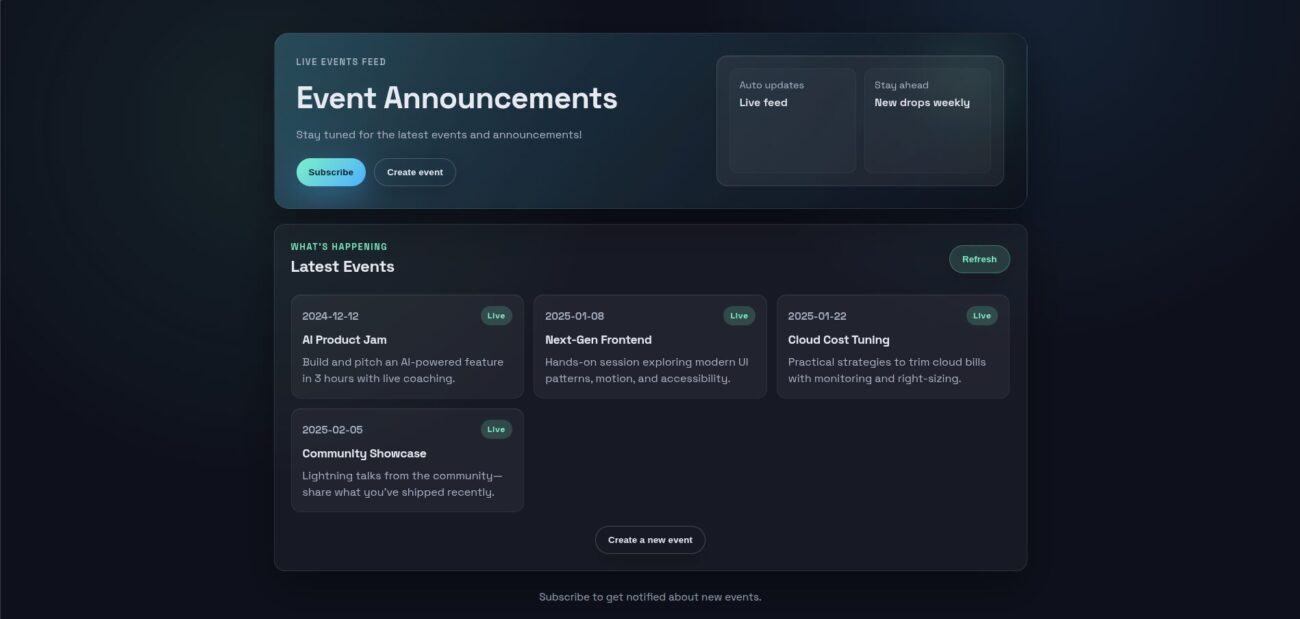
Test the Website
Once the updates are live, thoroughly test the website to ensure all functionalities are working as expected:
Access the Website: Open your website in a browser using the S3 bucket URL.
Conclusion
This project shows why serverless architecture is often a better strategic choice than traditional EC2-based deployments for lightweight and event-driven apps.
You are in charge of setting up, scaling, patching, monitoring, and keeping your EC2 server up and running, even when there is no traffic. You pay for capacity whether or not it is used, and managing users usually requires extra setup, custom authentication logic, and ongoing maintenance.
On the other hand, the serverless method used here puts the operational burden on AWS:
- Lambda only runs code when it needs to.
- You don’t have to plan for capacity with API Gateway; it scales automatically.
- SNS takes care of user subscriptions and notifications without having to keep track of user databases.
- S3 offers long-lasting storage and static hosting with almost no operational costs.
Serverless does away with idle infrastructure and lets you pay for only what you need, which is good for both costs and operations. From a user-management point of view, services like get rid of the need to build and protect custom user systems. This lowers the risk, development time, and attack surface.