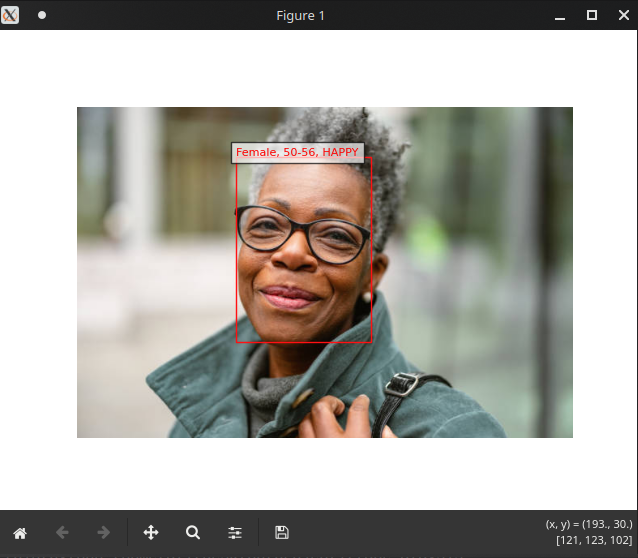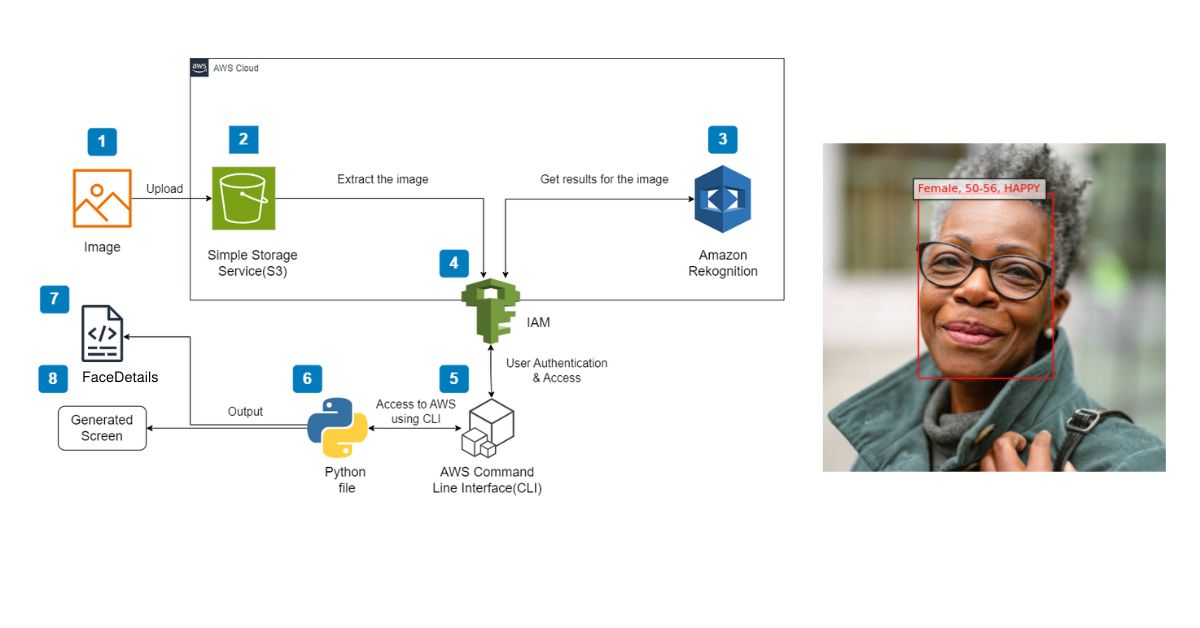

In this project, we’re building a small face-analysis tool using Amazon Rekognition. The workflow is simple. You upload an image to an S3 bucket, the script reads the file name, sends it to Rekognition through boto3, and retrieves the details for every detected face. We extract attributes like age range, gender, and dominant emotion. Then Python writes those results directly onto the image using a red marker, similar to the sample you saw. It is a lightweight setup that gives you a clear and instant look at what Rekognition can detect.
Steps We Followed to Run the Project
- Creating an Amazon S3 Bucket
- Uploading Images to the S3 Bucket
- Installing and Configuring the AWS Command Line Interface (CLI)
- Importing Libraries
- Adding the Face Details Function
- Adding the Main Function
- Running Your Python File
Services Used
Amazon S3 Used to store the input images.
Amazon Rekognition Used to analyse the images and extract face attributes.
AWS CLI Used to interact with AWS services through the command line.
Before Running the Code
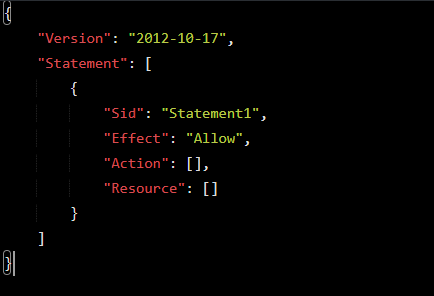
Create a new IAM user with the AmazonRekognitionFullAccess policy. and the following custome-managed policy to restict access of the use to only the targeted bucket. less permissions better for security.
Here it is in **proper code-block markdown for your blog**, clean and ready to paste:
{
  "Version": "2012-10-17",
  "Statement": [
    {
      "Sid": "AllowListBucket",
      "Effect": "Allow",
      "Action": [
        "s3:ListBucket",
        "s3:GetBucketLocation"
      ],
      "Resource": "arn:aws:s3:::YOUR-BUCET-NAME"
    },
    {
      "Sid": "AllowObjectReadWrite",
      "Effect": "Allow",
      "Action": [
        "s3:GetObject",
        "s3:PutObject",
        "s3:DeleteObject"
      ],
      "Resource": "arn:aws:s3:::YOUR-BUCET-NAME/*"
    }
  ]
}
Then generate an Access Key and Secret Access Key. You will provide these credentials when configuring AWS CLI.
To check whether AWS CLI is installed correctly, run:
aws --version
To configure the AWS CLI, run:
aws configure
Best Practices When Using Access Keys
- Never store your access key in plain text, in a repository, or inside code.
- Disable or delete any unused access keys.
- Apply least-privilege permissions.
- Rotate access keys regularly.
Python Code Explanation
The analyze_faces function accepts an S3 bucket and object key, calls detect_faces with Attributes=['ALL'], and prints an easy-to-read summary for each person Rekognition detects, including estimated age range, gender, and dominant emotion.
After collecting the attributes, the script downloads the same image from S3, renders it with Matplotlib, and overlays a red bounding box along with a compact label (gender, age range, dominant emotion).
Running main() will analyze the default YOUR-IMAGE-NAME object in the YOUR-S3-BUCKET-KEY bucket. Make sure you replace these placeholders with your actual image name and bucket name. Also confirm that AWS credentials are configured in your terminal so boto3 can access both S3 and Rekognition.
Code Repository
The code in github on this link